C-5 · Household Composition
Book C — Daily User Guide · Part 2 Applicants & Intake · draft v1 (2026-08-29)
Who: loan coordinators / caseworkers When: right after the project is created (▸ C-3) or imported (▸ C-4), before income (▸ C-6). Where: project window ▸ APPLICATION ▸ App Review ▸ Application Review ▸ the Household Composition grid at the foot of the tab. 📷
C08-00c
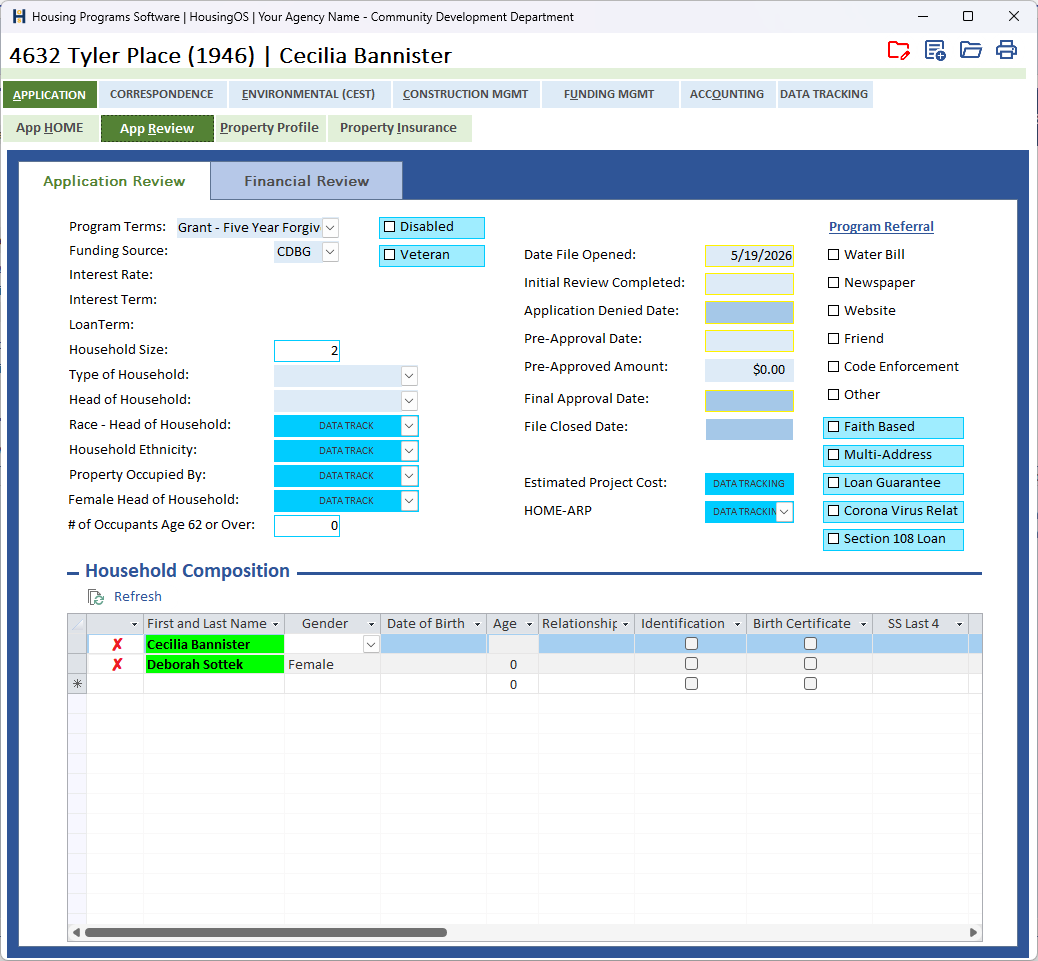
What you'll end up with
One row per person living in the home, with date of birth, relationship, sex and ID, and a flag saying whether they earn income. From these rows HousingOS counts the household size (which picks the income limit), the members aged 62 or over (for senior-program rules), and — as income work proceeds — shows a green ✓ / red ✗ per member telling you whether everything for that person has been reviewed and verified.
Part A — The applicants are already there
- The applicant and co-applicant from the APPLICATION tab appear in the household list automatically — name, sex, date of birth, age and government ID are copied from the applicant record whenever it changes. You never type the applicants in a second time.
- A co-applicant row appears only when a co-applicant name exists.
- Editing a name on the APPLICATION tab updates the household row; it never creates a duplicate.
- Removing a member is always manual — HousingOS never deletes household rows.
- Refresh above the grid is a "re-sync now" if the rows look stale; it is safe to click any time.
📷
C05-01Household list showing the two synced applicant rows.
Part B — Add the other members
- In the blank row at the bottom enter First and Last Name, Gender, Date of Birth (the Age column fills), Relationship, and tick Identification, Birth Certificate and enter SS Last 4 as the documents come in. Refresh (link above the grid) re-syncs the applicants.
- When you enter a Date of Birth HousingOS calculates the age (as of the approval date if one is set, otherwise today). For anyone 18 or older it asks "Does this Household Member receive income?" — answer Yes to tick Income Earner. Under-18s are never income earners. Double-click the DOB to re-run the question later. After a Yes it asks a second question: "Does this Household Member file federal income taxes?" — Yes, No, or Unknown (the Files federal taxes? box shows the answer and can be changed later). The Application Checklist (▸ C-8a) asks for a tax return on Yes, a statement of non-filing on No, and puts the question itself into the applicant's request letter on Unknown. Adults with no income are never asked; they get the non-filing statement. The Identification and Birth Certificate boxes are linked to the checklist both ways: ticking a box marks that member's photo-ID or birth-certificate row received, and marking the row received on the checklist ticks the box.
- Only members with Income Earner ticked appear in the household-member pick-lists on the income, bank and asset cards (▸ C-6). If someone is missing from a pick-list, this box is the reason.
📷
C05-02The Income Confirmation prompt after entering a DOB.
Part C — What HousingOS derives from the list
- Household Size (top of Financial Review) is counted from the rows and drives the HUD income-limit lookup (▸ C-6). If you add or remove a member, refresh the income determination.
- # of Occupants Age 62 or Over (Application Review) — double-click the box to recount members whose age is over 62.
- Per-member verdict. The first column shows a ✓ (green) when everything for that member is done, or a red ✗ (and the name highlighted green while income is still being worked) — outstanding means any of:
- an income source on their income card not yet marked reviewed;
- a bank account of theirs with deposits still Unclassified;
- an asset row not yet reviewed;
- an employment-verification letter sent but not back;
- a deposit-verification letter sent but not back;
- an income earner with no income row entered at all;
- any open row for that member on the Application Checklist (▸ C-8a) — ID, birth certificate, tax return, paystubs, statements.
This is computed live — nothing to set here. The manual Income Verification Received / Bank Verification Received boxes on the Financial Review remain your final attestation (▸ C-6 step 12).
📷
C05-03Household list with one ✓ row and one ✗ row showing the outstanding note.
Watch-outs
- Don't add the applicants by hand. If you see two rows for the applicant, one came from an old manual add; delete the one without the applicant's ID and the sync will keep the other current.
- Deleting a member asks "Would you like to delete the current Household Member?" — their income, bank and asset rows are not deleted with them; remove those first or they'll show as orphaned in the income totals.
- Age uses the approval date once one is entered on the Application Review — so an age can "go back" a year after approval is dated. That is intentional (eligibility is determined as of approval).
- Changing Income Earner later does not remove income records already entered for that person.
- Program Type must be set before the household list will take focus (it opens the Program Type drop-down for you).
Screenshot shot list (Demo backend)
| Shot | Where | What to capture |
|---|---|---|
| C05-00 | Application Review | the whole Household Composition area (locks column captions) |
| C05-01 | list | the two synced applicant rows |
| C05-02 | prompt | "Does this Household Member receive income?" |
| C05-03 | list | ✓ and ✗ rows with the outstanding-detail column |
Video script — "Household composition" (target 1½ min)
| # | On screen | Narration |
|---|---|---|
| 1 | Household list | "The applicant and co-applicant are already here — HousingOS copies them from the application and keeps them in sync." |
| 2 | Add a member | "Add everyone else living in the home: name, relationship, sex, date of birth." |
| 3 | DOB → prompt | "Enter the date of birth and HousingOS works out the age. For adults it asks whether they receive income — that's what puts them on the income cards." |
| 4 | Household size, 62+ | "Household size and the over-62 count come from this list and feed the income limits." |
| 5 | ✓ / ✗ column | "As you verify income, each member turns green when nothing is outstanding — red tells you exactly what's left." |
| 6 | Outro | "Next: income determination." |
Open items for John (this chapter)
captionsconfirmed from screenshot 08-29. The ✗ column is live; is there an outstanding-detail column, or only the mark?