C-17 · Yearly Monitoring
Draft page
Captions marked [confirm] and the "Open items" section are still being verified against the live product.
Book C — Daily User Guide · Part 5 Loans & Closing · draft v1 (2026-08-29)
Who: loan coordinators / compliance staff When: once a year for every project with an open loan or affordability period — confirming owner occupancy and insurance. Where: Navigation form ▸ Yearly Monitoring; per project, the Insurance list (▸ C-9) and the project's monitoring block.
What you'll end up with
A monitoring year created for every project still under monitoring, each owner's insurance and occupancy confirmed (or flagged), the Monitoring Letter sent, and the year's results printable for the file and for reporting.
Part A — Create the monitoring year
- Click Yearly Monitoring on the Navigation form. The list of monitored owners fills the top (name, Print tick, year, letter/due/completed dates, colour-coded — GREEN pending · YELLOW past due · AQUA complete); the detail panel sits below. 📷
C17-00
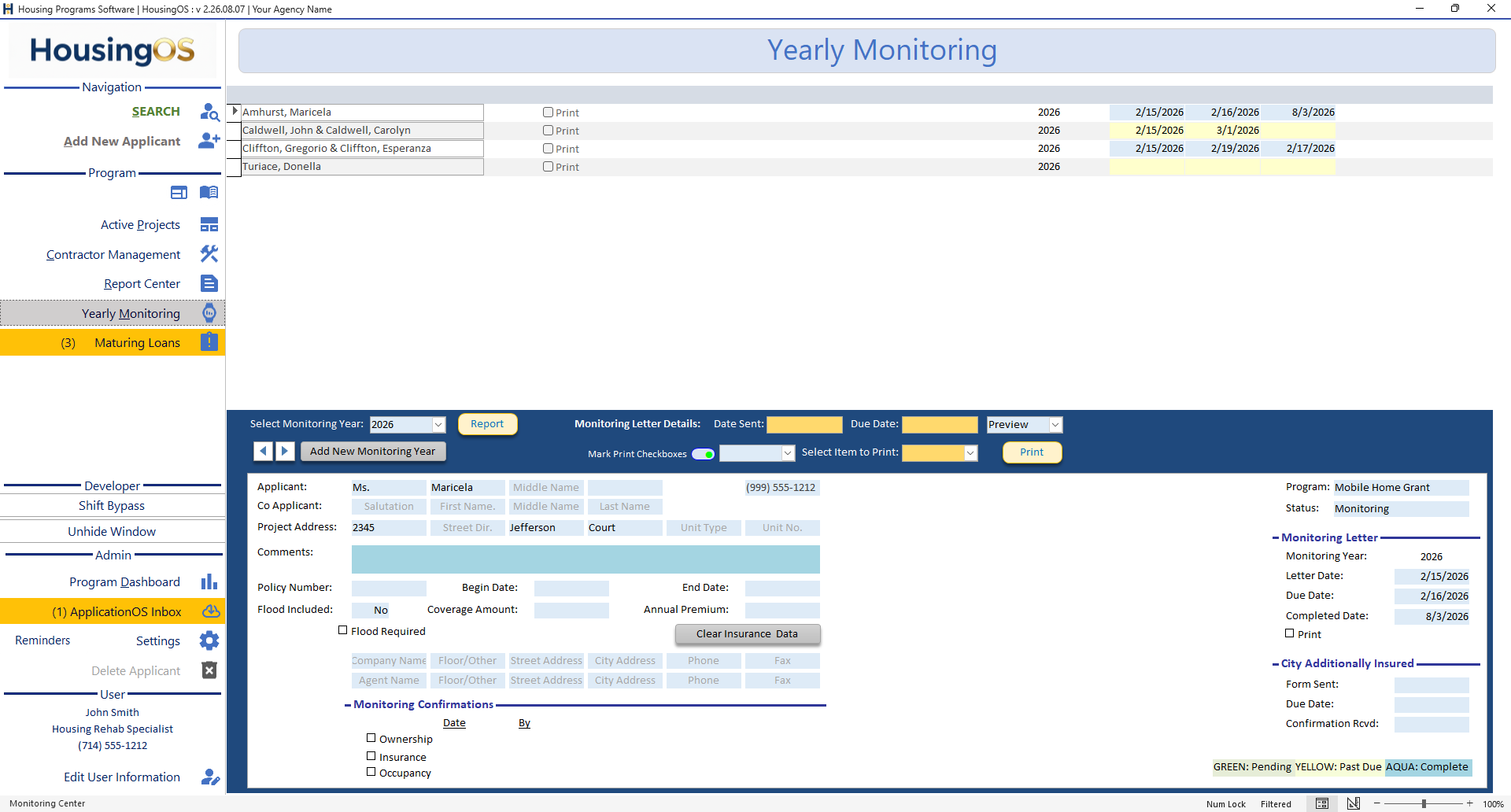 2. Select Monitoring Year (or ◀ ▶) and click Add New Monitoring Year (4 digits — "Please enter a valid 4-digit year (e.g., 2025)."). HousingOS creates a monitoring record for every project marked for monitoring and copies last year's data forward ("Monitoring records for year 2026 have been created and data copied from 2025."), so you only change what's different.
3. Fix Missing Monitoring [confirm caption — cmdfixmissingmonitoring] adds records for owners who have no insurance history yet ("N new homeowners … were added" / "No new records created.").
📷
2. Select Monitoring Year (or ◀ ▶) and click Add New Monitoring Year (4 digits — "Please enter a valid 4-digit year (e.g., 2025)."). HousingOS creates a monitoring record for every project marked for monitoring and copies last year's data forward ("Monitoring records for year 2026 have been created and data copied from 2025."), so you only change what's different.
3. Fix Missing Monitoring [confirm caption — cmdfixmissingmonitoring] adds records for owners who have no insurance history yet ("N new homeowners … were added" / "No new records created.").
📷 C17-01 Monitoring card with the year created.
Part B — Work the list
- For each owner confirm the Monitoring Confirmations — Ownership, Insurance, Occupancy (date and by whom) — and update the policy (Policy Number, Begin/End Date, Coverage, Premium, Flood Included / Flood Required, company and agent lines); this is the same data as the project's Property Insurance (▸ C-9). Comments for anything unusual. The right-hand panel shows Program, Status, the Monitoring Letter dates (Letter Date, Due Date, Completed Date) and City Additionally Insured (Form Sent, Due, Confirmation Rcv'd).
- Clear Insurance Data wipes the current row's copied values if you'd rather start it blank ("Current record cleared." — confirms first).
Part C — Letters and reports
- Tick Print on rows, or switch Mark Print Checkboxes on and pick a program to mark a whole program-year ("Records for '‹program›' in ‹year› marked for printing.") — switch off to unmark.
- Monitoring Letter Details — set Date Sent, Due Date, choose Preview or print, pick Select Item to Print (letter / form) and click Print for the marked rows; Report prints the year's monitoring report.
📷
C17-02Rows marked for printing + the report.
Part D — What monitoring feeds
- The dashboard's Yearly Monitoring header and the Monitoring status card count projects not yet confirmed for the year; Maturing Loans (▸ C-16) is separate — it watches loan maturity, not occupancy.
Watch-outs
- Create the year once. Creating it again for the same year does nothing harmful but re-copies nothing — use Fix Missing Monitoring to add late starters.
- Insurance rows are shared with the project's Insurance list — editing here updates the project file and vice-versa.
- Projects without "monitoring" in their status are skipped — if a project is missing, check its status/flags first.
- Letters need the template — "No Document Set-Up For This Coded Name 'Monitoring Letter'" → administrator (▸ B-7).
Screenshot shot list (Demo backend)
| Shot | Where | What to capture |
|---|---|---|
| C17-00 | ✅ have it |
Video script — "Yearly monitoring" (target 1½ min)
| # | On screen | Narration |
|---|---|---|
| 1 | Create New Year | "Each year, enter the year and click Create New Year — HousingOS copies last year's monitoring forward for every project." |
| 2 | Rows | "Confirm occupancy and insurance per project; only change what's different." |
| 3 | Mark for printing → letter/report | "Mark the rows, send the Monitoring Letters, and print the report for the file." |
Open items for John (this chapter)
captionsconfirmed 08-29. Where is Fix Missing Monitoring (cmdfixmissingmonitoring) on the card? Which flag marks a project "under monitoring"?