C-15 · Loan Closing
Draft page
Captions marked [confirm] and the "Open items" section are still being verified against the live product.
Book C — Daily User Guide · Part 5 Loans & Closing · draft v1 (2026-08-29)
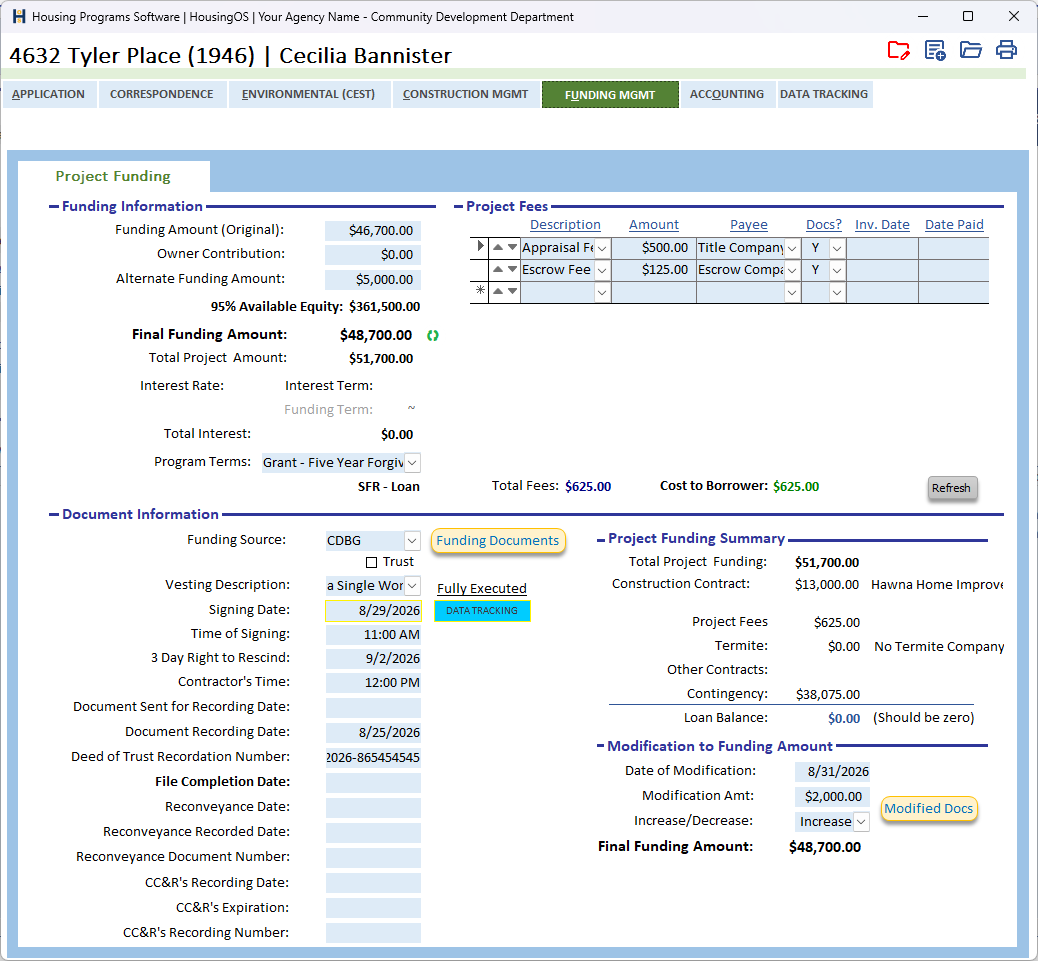
Who: loan coordinators When: after approval and before construction funds are committed — the loan (or grant) documents are prepared, signed, and recorded. Where: project window ▸ FUNDING MGMT ▸ Project Funding — the Document Information block and Funding Documents / Modified Docs buttons; loan numbers via Project ID's on App HOME. 📷
C15-00
What you'll end up with
A loan number assigned, the fees that are part of the loan listed and included, the closing summary in balance with the contracts, the funding documents (loan agreement, note, deed of trust, truth-in-lending, escrow instructions, disclosures — whatever the program and funding source require) merged and signed, and the recording information captured so the file can later be reconveyed.
Part A — Loan number and terms
- Project ID's (App HOME, beside Project ID) opens the loan-number register: assign the next number for the funding source to this project (the register keeps the sequence per source). The number prints on every loan document.
- Check the program terms shown (interest rate, term, funding type, forgiveness) — they came from the Program Terms picked at intake (▸ C-8). Loan Term blank or
~means no maturity (deferred/forgivable with no due date); a number is years. - Date Papers Signed, Loan Origination Date and Final Loan Amount are required later by the accounting engine ("Loan Origination Date is Missing…"); enter them as soon as they are known.
Part B — Fees
- The Project Fees grid (Description · Amount · Payee · Docs? · Inv. Date · Date Paid) holds the closing costs — appraisal, title, escrow, recording, termite, contingency … — from the fee schedule your administrator set up (▸ B-5). Set Docs? = Y on each fee that is part of this loan's documents; Total Fees / Cost to Borrower are what the summary and the contingency calculation use (▸ C-13 ledger). Use ▲▼ to order them as they should print.
Part C — Closing summary
- The Project Funding Summary compares contracts (prime + subs + termite) with the funding. If it doesn't balance you'll see "Loan Closing Summary is out of balance. Check contract numbers. (Re)select the winning contractor." — go back to Inspection/Bids or Contract Management, then return.
- The green ↻ beside Final Funding Amount rewrites the final figure from the summary ("This will update the 'Final FUNDING Amount.' Is this what you want to do?").
📷
C15-01✅ covered by C15-00.
Part D — Produce the funding documents
- Tick Amount Words [not visible on the tab — confirm where] and check the spelled-out loan amount is showing — several documents refuse to merge without it ("Please check the 'Amount Words' box … to make sure the words are showing").
- Fill the Document Information block — Funding Source, Trust, Vesting Description, Signing Date, Time of Signing, 3 Day Right to Rescind, Contractor's Time — then click Funding Documents. HousingOS checks the file — "Important Loan Information Is Missing", property address, termite company chosen (or No Termite Company), prime contractor selected, vesting, APN/legal description, funding source — and then merges the document set for this program and funding source into 2 – Documents. Individual documents (loan agreement, TIL, escrow instructions, disclosure) also have their own buttons [confirm captions], each with the same checks. "No Document Set-Up For This Program and Funding Source" means the administrator hasn't attached a template for that combination (▸ B-7).
- Modified Docs (in Modification to Funding Amount) merges the loan-modification set when the loan amount changes after signing ("Important Information for this Document Is Missing" if the modification fields are blank).
📷
C15-02✅ covered by C15-00. Tick Fully Executed when the signed set is back.
Part E — Signing and recording
- Record Document Sent for Recording Date, Document Recording Date and Deed of Trust Recordation Number when the deed of trust comes back from the recorder, then File Completion Date; the Reconveyance Date / Recorded Date / Document Number and CC&R's fields are filled at the end of the loan (▸ C-16) — the reconveyance needs the recording data ("Document Return Date is MISSING", "The Document Recording Number is MISSING").
- The status checklist and the accounting engine now treat the loan as originated; interest starts accruing from the origination date (▸ C-16).
Watch-outs
- Out of balance almost always means a change order or termite figure was entered after the funding was set — update funding (▸ C-14) or re-select the contractor.
- Amount Words is a HousingOS Field, not decoration — leave it ticked.
- One template set per program × funding source. A new funding source needs its documents attached before the first closing.
- Grants follow the same screen with the loan fields blank; the Funding Type on the terms decides which documents apply.
Screenshot shot list (Demo backend)
| Shot | Where | What to capture |
|---|---|---|
| C15-00 | ✅ have it |
Video script — "Closing the loan" (target 2½ min)
| # | On screen | Narration |
|---|---|---|
| 1 | Loan Numbers | "Assign the loan number from the register — it prints on every document." |
| 2 | Fees | "Tick the fees that are part of this loan. Total Included feeds the closing summary and the contingency." |
| 3 | Summary | "The summary must balance with the contracts; if not, HousingOS tells you to re-check the contract figures." |
| 4 | Funding Documents | "Click Funding Documents. HousingOS checks the file, then merges the full document set for this program and funding source." |
| 5 | Recording | "When the deed of trust is recorded, enter the return date and recording number — the reconveyance will need them." |
| 6 | Outro | "Next: loan servicing and payoffs." |
Open items for John (this chapter)
location / most captionsconfirmed 08-29. Still: where Amount Words and the individual document buttons (loan agreement / TIL / escrow / disclosure) are — under Funding Documents as a picker?