C-14 · Project Funding, Payments and Disbursements
Draft page
Captions marked [confirm] and the "Open items" section are still being verified against the live product.
Book C — Daily User Guide · Part 4 Construction · draft v1 (2026-08-29)
Who: rehab specialists / finance staff When: funding is set at approval; disbursements run from the Notice to Proceed until lien releases and final payment. Where: funding on FUNDING MGMT ▸ Project Funding (📷
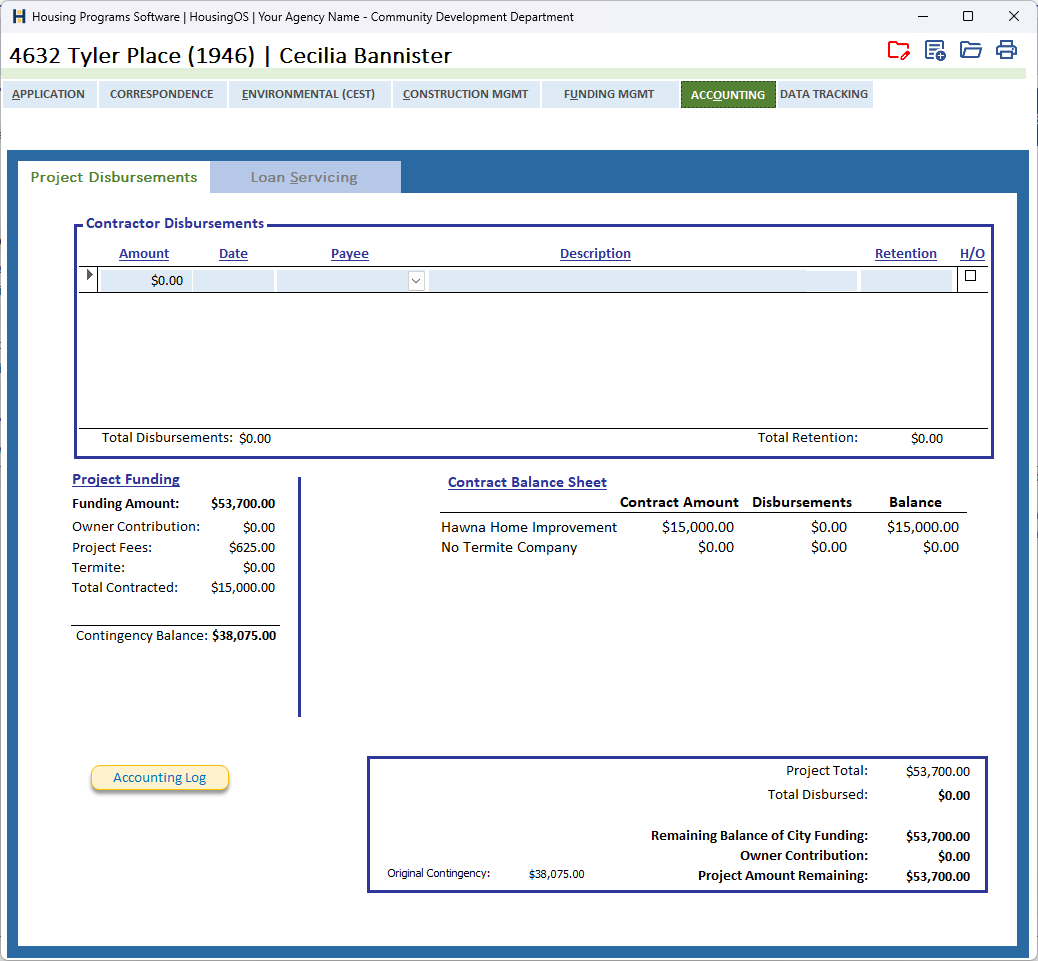
C15-00✅); disbursements on ACCOUNTING ▸ Project Disbursements (📷C14-00
 ).
).
What you'll end up with
A funding amount for the project (contract + other costs + contingency) recorded against its funding source, and every disbursement to the contractor, subcontractors and other payees listed with its retention, so Total Paid, Retention held and the remaining balance are always current and the status card shows them.
Part A — Set the project funding
- On FUNDING MGMT ▸ Project Funding, the Funding Information block holds Funding Amount (Original), Owner Contribution, Alternate Funding Amount, the 95 % Available Equity check, and the computed Final Funding Amount and Total Project Amount; Program Terms (with Interest Rate / Term, Funding Term, Total Interest) sit beneath.
- The Project Fees grid lists the closing costs — Description, Amount, Payee, Docs?, Inv. Date, Date Paid — with ▲▼ to reorder; Total Fees and Cost to Borrower total below (▸ C-15 for which fees are included).
- The Project Funding Summary shows Total Project Funding − Construction Contract − Project Fees − Termite − Other Contracts = Contingency, and the Loan Balance (should be zero). Click Refresh after changes on other tabs.
- Modification to Funding Amount — enter Date of Modification, Modification Amt and Increase/Decrease; the Final Funding Amount follows (the green ↻ beside it recalculates), and Modified Docs merges the modification documents (▸ C-15).
📷
C14-01✅ covered by C15-00.
Part B — Record disbursements
- On ACCOUNTING ▸ Project Disbursements, the Contractor Disbursements grid takes a row per payment: Amount, Date (double-click = today), Payee (pick a contractor, subcontractor or other payee — double-click a payee name to open their record), Description (limited length — you're warned "This field can only have N characters"), Retention withheld, and H/O (homeowner/other, i.e. non-contractor).
- Tick H/O for payments that are not to the construction contractor (appraiser, title company, termite, permits) so they're excluded from the contractor's paid-to-date.
- Total Disbursements and Total Retention recalculate on every edit. The Project Funding block (Funding Amount, Owner Contribution, Project Fees, Termite, Total Contracted, Contingency Balance), the Contract Balance Sheet (per contractor: Contract Amount, Disbursements, Balance) and the summary box (Project Total, Total Disbursed, Remaining Balance of City Funding, Owner Contribution, Project Amount Remaining, Original Contingency) all update with it.
- Accounting Log prints the disbursement ledger for the file.
📷
C14-02✅ covered by C14-00.
Part C — Subcontractor disbursements
- The Subcontractor Disbursements view shows, per subcontract, the amount paid so far against the Sub Contract Amount — the payee on a disbursement row ties it to the subcontract. Progress payments to subs are entered in the same Disbursements list with the sub as payee.
Part D — Closing out payments
- When the final payment is made and lien releases are in, record Payments Complete and Lien Releases Received on Project Management (▸ C-13 Part E). Retention is released as its own disbursement row (negative retention, positive disbursement) [confirm practice].
Watch-outs
- Funding shortfall. If funding is less than contracts, the award step blocks (▸ C-12) and Remaining Contingency on Contract Management shows in parentheses — raise the funding (Update Final Funding Amount) or reduce scope.
- Retention is money not yet paid — it stays in Total Retention until you release it; the status card's balance-remaining reads it.
- Description length is enforced because it merges onto the check request; shorten rather than abbreviate cryptically.
- Deleting a disbursement has no confirmation beyond the audit log — check the row before you delete.
Screenshot shot list (Demo backend)
| Shot | Where | What to capture |
|---|---|---|
| C14-00, C15-00 | ✅ have them |
Video script — "Funding and disbursements" (target 2 min)
| # | On screen | Narration |
|---|---|---|
| 1 | Funding dialog | "Set the project funding: contract, other costs, and a contingency — ten percent with one tick." |
| 2 | Disbursement rows | "Each payment is a row: date, payee, description, amount and any retention. Totals update as you go." |
| 3 | Non-contractor tick | "Tick Non-Contractor for appraisers, title, termite and permits so the contractor's paid-to-date stays clean." |
| 4 | Payments Complete | "When the last check and lien releases are in, mark Payments Complete on Project Management." |
| 5 | Outro | "Next: loan closing." |
Open items for John (this chapter)
tab contents / captionsconfirmed 08-29.- How retention release is recorded in practice; whether a check request document exists; what the green ↻ beside Final Funding Amount does exactly.