C-16 · Accounting, Loan Servicing and Payoffs
Draft page
Captions marked [confirm] and the "Open items" section are still being verified against the live product.
Book C — Daily User Guide · Part 5 Loans & Closing · draft v1 (2026-08-29)
Who: finance staff / loan coordinators When: from origination through payoff and reconveyance; and whenever a balance, payoff figure or receipt is needed. Where: project window ▸ ACCOUNTING ▸ Loan Servicing sub-tab; the (n) Maturing Loans card on the Navigation form (📷
C16-03
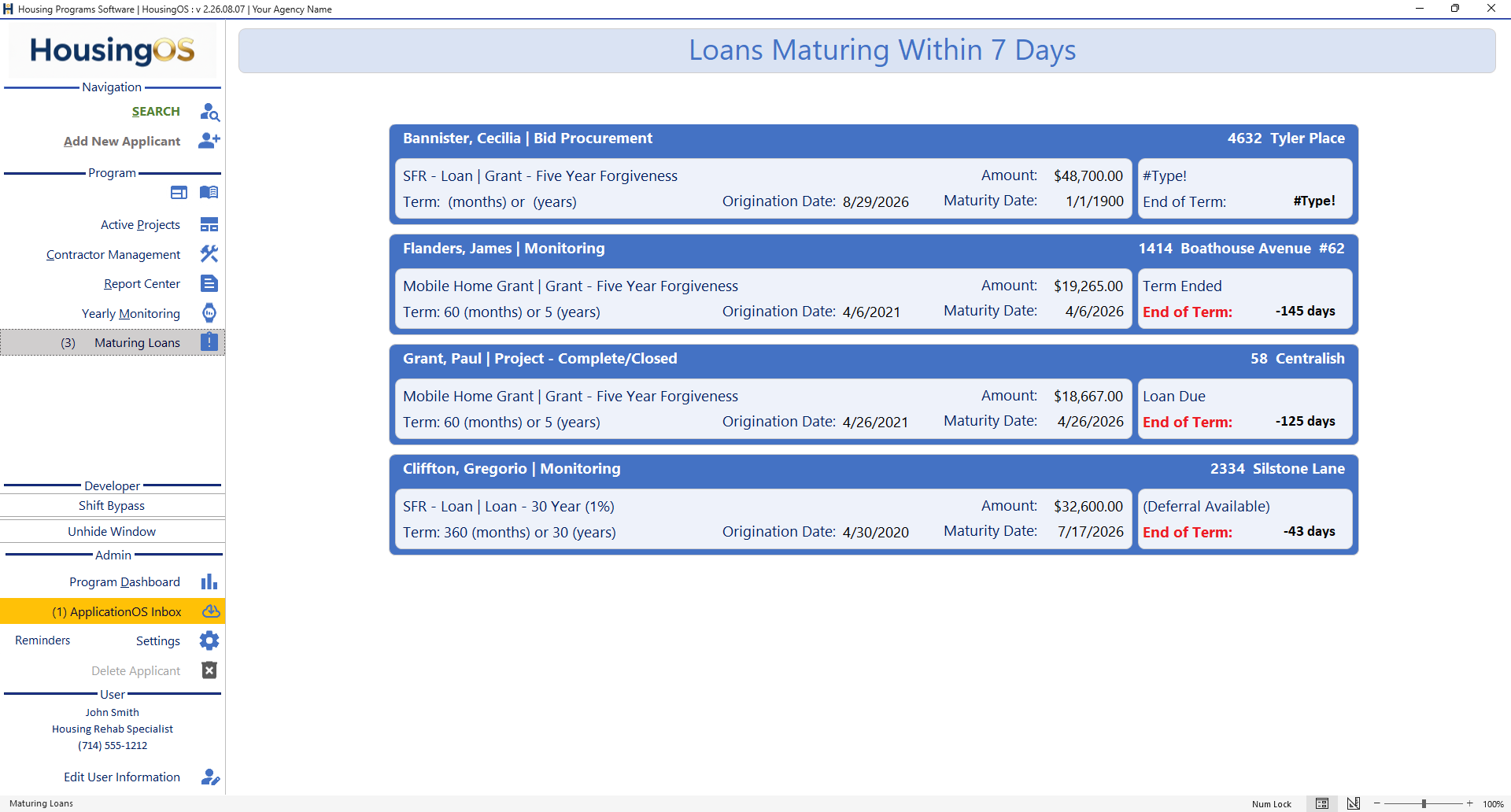 ).
).
What you'll end up with
The loan's balances — principal, accrued and paid interest, forgiven amounts, balance due — calculated to a chosen date; payments received recorded with receipts; a payoff statement for a requested date; and, once paid or forgiven, the reconveyance produced from the recording information.
Part A — Calculate balances
- Click Calculate Balances [confirm caption — btnCalculateBalances]. HousingOS needs Loan Origination Date, the Funding Term (program terms) and Final Loan Amount — each missing one is named. It then fills: - Original Loan Amount, Principal Paid, Principal Balance; - Interest Accrued (lifetime), Interest Paid, Interest Balance (unpaid); - Principal Forgiven / Interest Forgiven (for forgivable loans, by the forgiveness schedule in the program terms); - Balance Due = principal balance + unpaid interest; Payments Made.
- Interest is calculated as of today unless a payoff date is pinned. The label next to the date reads Interest Calculated As Of: (today, moves every day), Payoff Date (pinned): (you pressed Enable Payoff or picked a statement date), or Payoff Date (final): (the loan is closed). Interest rates are stored as fractions (0.03 = 3 %) — the screen shows the percentage.
📷
C16-01Accounting tab after Calculate Balances with the as-of cue.
Part B — Record a payment
- Click Payments [confirm caption] to open the payment window: Payment Date (double-click = today), Payment Type, Amount, Memo — all required ("All boxes must be completed.", "Payment cannot be $0.00"). Receipt saves the payment, recalculates balances, and produces the receipt document for the borrower. Cancel discards an incomplete entry ("The payment information is incomplete. Payment will be erased.").
- Edit Payments [confirm caption] reopens past payments to correct or delete one (Previous / Next / Delete); balances recalculate after any change.
📷
C16-02Payment window.
Part C — Payoff statement
- Click Enable Payoff [confirm — PayoffEnableBtn], enter the requested Payoff Date, and click Payoff [confirm — btnPayoff]. Interest is computed to that date and the payoff statement is merged. The date stays pinned for this loan until you clear it, so a re-print shows the same figure. Preview Report [confirm] shows the amortisation/ledger.
- Deferral / Extension [confirm — btnDeferralExtension] records an approved deferral or term extension; the maturity date and the Maturing Loans card follow it.
Part D — Reconveyance
- When the loan is paid or forgiven, enter the Final Payoff Date, then click Reconveyance. HousingOS needs the Document Recording Date, Recordation Number, Reconveyance Date and APN ("Document Recording Information is Missing…"), asks "Does this Reconveyance have a 'Substitution of Trustee'?" (Yes / No / Cancel — picks the matching template), and may ask about vesting. The document set for the funding source merges into the project folder; "Create a Project Folder" appears if the project has none.
- Tick Recorded Docs / Recon Check [confirm captions] as the recorded reconveyance comes back; the loan drops off the servicing lists.
Part E — Maturing loans
- The Navigation form's (n) Maturing Loans button lights up when loans are due within your agency's reminder window (weeks set by the administrator ▸ B-4). Click it for Loans Maturing Within N Days — a card per loan (program, terms, amount, origination and maturity dates, and a status such as Term Ended, Loan Due, (Deferral Available) with days past end of term); double-click a row to open the project (the project window must be closed first — "The Project Navigation form is already open. Please close it first."). Loans with no maturity (blank/
~term) never appear. - Loan Servicing [confirm — Loan__Servicing] prints the servicing report for the loan.
Watch-outs
- Balances look stale? Click Calculate Balances — the engine runs on demand, and Interest Calculated As Of tells you the date used.
- Payoff figure "wrong" for a past date — check whether the date is pinned to an earlier statement; clear the pin to recompute to today.
- Never edit the balance fields by hand — they are outputs; edit the payments or the loan terms instead.
- Interest rate entered as 3 instead of 0.03 produces absurd interest — the administrator's program terms hold the rate; report it rather than "fixing" a project.
- Receipts and payoffs issued before mid-2026 may have been computed with an earlier rate convention — if a borrower questions one, recalculate and reissue.
Screenshot shot list (Demo backend)
| Shot | Where | What to capture |
|---|---|---|
| C16-00 | ACCOUNTING tab | whole tab (locks captions) |
| C16-01 | balances block | after Calculate Balances, cue label visible |
| C16-02 | Payment window | filled |
| C16-03 | ✅ have it |
Video script — "Servicing the loan" (target 2½ min)
| # | On screen | Narration |
|---|---|---|
| 1 | Calculate Balances | "Click Calculate Balances — principal, interest accrued and paid, forgiveness and balance due, as of today." |
| 2 | Payments | "Record a payment with its date, type, amount and memo; Receipt saves it, recalculates, and prints the receipt." |
| 3 | Payoff | "For a payoff, enable the payoff date, enter it, and produce the statement. The date stays pinned so reprints match." |
| 4 | Reconveyance | "When the loan is satisfied, enter the recording details and click Reconveyance — with or without substitution of trustee." |
| 5 | Maturing Loans | "The Maturing Loans button on the Navigation form lights up when loans are coming due." |
| 6 | Outro | "Next: yearly monitoring." |
Open items for John (this chapter)
- Captions for all ACCOUNTING buttons (Calculate Balances, Payments, Edit Payments, Enable Payoff, Payoff, Preview Report, Deferral/Extension, Reconveyance, Loan Servicing, Recorded Docs, Recon Check).
- Whether the "reissue pre-mid-2026 receipts/payoffs" note should stay in the user guide or move to the admin guide.
- ⚠ BUG seen in screenshot: the Bannister card on Maturing Loans shows #Type! for a grant with no term (Maturity Date 1/1/1900) — the card expression needs a Null guard.
- Still need a Loan Servicing sub-tab screenshot for the button captions.