C-9 · Property Profile, Title, Mortgages and Insurance
Draft page
Captions marked [confirm] and the "Open items" section are still being verified against the live product.
Book C — Daily User Guide · Part 3 Property & Environmental · draft v1 (2026-08-29)
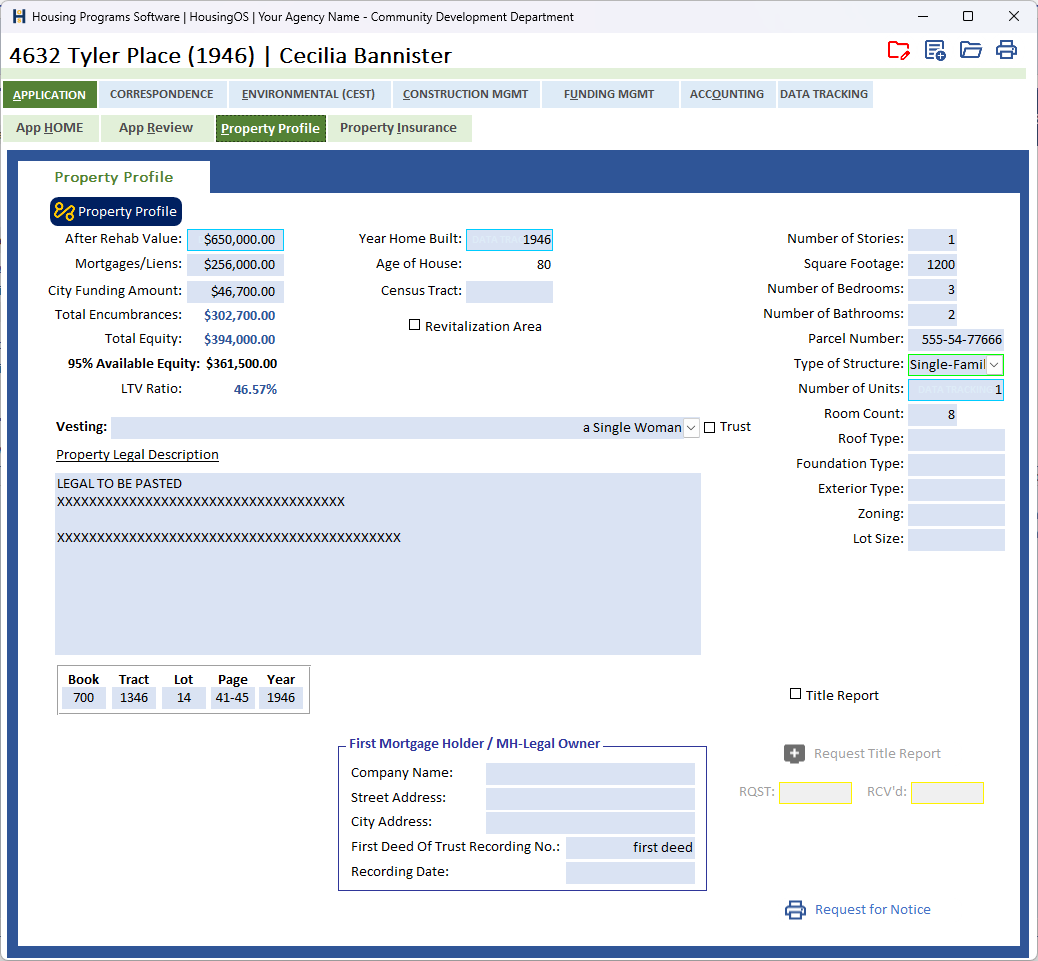
Who: loan coordinators / rehab specialists When: during intake, before the loan amount is finalised and before the construction contract (which needs the insurance on file). Where: project window ▸ APPLICATION ▸ Property Profile sub-tab and Property Insurance sub-tab. 📷
C09-00
 ·
· C09-03
What you'll end up with
The property's facts (type, year built, legal description, APN, values), its mortgages and equity, the title report and mortgage verification requested and received, vesting recorded for the Request for Notice, and the homeowner's insurance policy on file for each year.
Part A — Property facts
- Click the Property Profile button (top left, the AI icon) to pull the profile from public records for the project address — structure type, year built, square footage, lot, bedrooms/baths, APN, owner, assessed values, and (where available) a property value estimate with recent sales comparables. Where a value already on the form differs from the pulled one you're asked "‹field› differs from RentCast: … replace?" per field. If nothing matches you'll see the reason (no match / service busy) and can enter the facts by hand.
- For mobile / manufactured homes the single-family fields hide and the mobile-home fields (decal number, title) show — driven by the structure type.
- Tick Built before 1978 when applicable — it flags the project for lead-based paint (▸ C-10) and is written to the environmental record.
- Vesting (with Trust tick), Property Legal Description (paste from title), Book / Tract / Lot / Page / Year, Parcel Number, Census Tract, Revitalization Area, and the structure facts (Stories, Square Footage, Bedrooms, Bathrooms, Type of Structure, Number of Units, Room Count, Roof/Foundation/Exterior, Zoning, Lot Size). Documents quote vesting and legal description verbatim.
📷
C09-01✅ covered by C09-00.
Part B — Mortgages and equity
- After Rehab Value, Mortgages/Liens (total existing encumbrances — or transfer them from the creditors list, ▸ C-7) and the City Funding Amount. HousingOS shows Total Encumbrances, Total Equity, 95 % Available Equity and LTV Ratio — or "No Available Equity – Over 95 % LTV". A loan above the available equity triggers "Loan Amount Exceeds Available Equity!!" (▸ C-7 step 8).
- First Mortgage Holder / MH-Legal Owner block — Company Name, Street/City Address, First Deed Of Trust Recording No., Recording Date. Required (shown in bold blue when missing) for the Mortgage Verification letter and (in red) for the Request for Notice.
Part C — Title and verification requests
- Tick Title Report to enable Request Title Report — clicking it stamps RQST with today's date and produces the request; fill RCV'd when it arrives.
- Tick Mortgage Verification to enable Mortgage Verification — stamps Sent, merges the Mortgage Verification Letter to the lender, saves it in 1 – Application. Double-click Received when the reply comes in.
- Request for Notice — asks "Is Vesting Needed?"; Yes highlights the vesting box for you to complete first, No proceeds; then merges the Request for Notice into 2 – Documents.
- Buttons stay disabled until their checkbox is ticked — that's how the file shows which requests apply to this project.
📷
C09-02Title / verification block with a request stamped.
Part D — Second property
- If the applicant owns another property (or the project covers a second parcel), Add Second Property [confirm caption] opens a small form to record its address and details; save and close to attach it to the project.
Part E — Insurance (year to year)
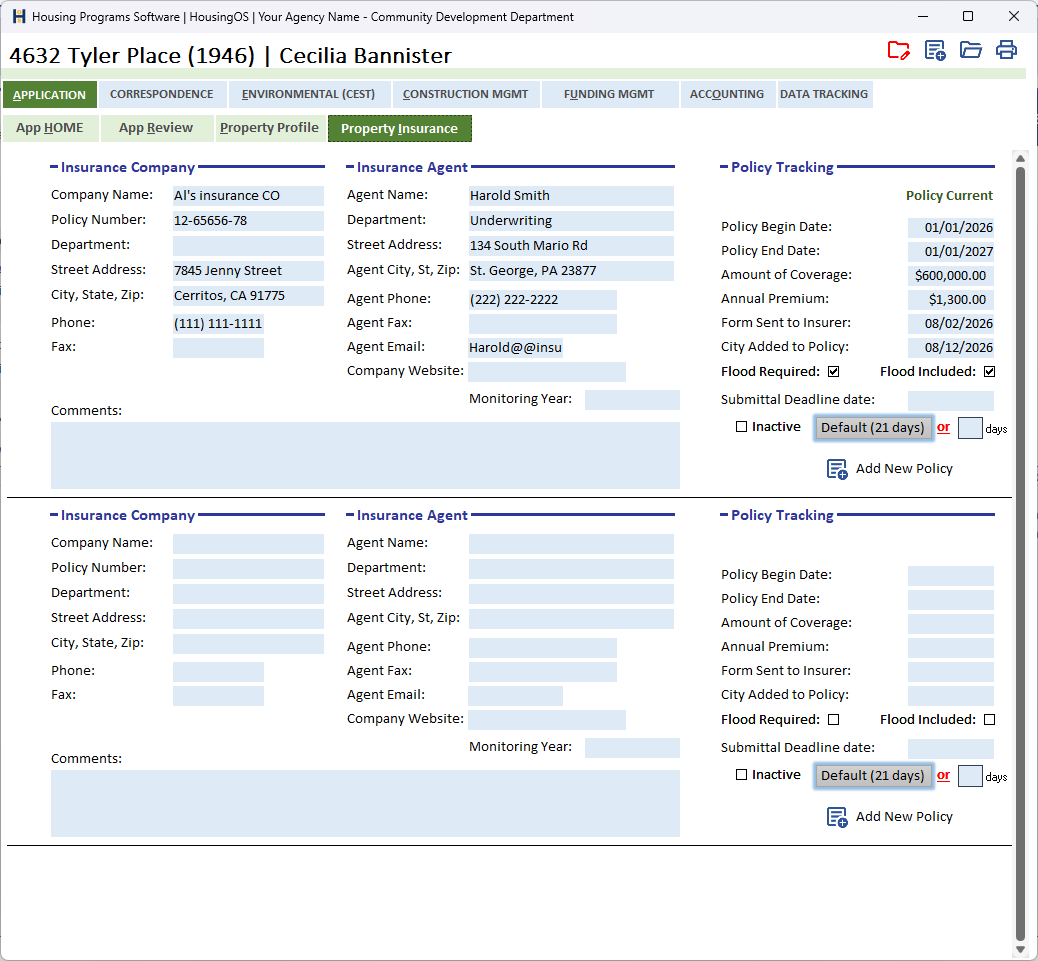
- Property Insurance keeps one block per policy: Insurance Company (name, policy number, address, phone), Insurance Agent (name, address, phone, email, website, Monitoring Year), and Policy Tracking (Policy Current, Begin/End dates, Amount of Coverage, Annual Premium, Form Sent to Insurer, City Added to Policy, Flood Required / Flood Included, Submittal Deadline with the Default (21 days) button or a custom number of days, Inactive). Add New Policy starts the next year's block; the history stays.
- A policy number must be on file before the construction contract or termite contract will merge ("Homeowner Insurance Information Is Missing…", ▸ C-13).
- Monitoring Letter merges the annual insurance/occupancy monitoring letter from this list (▸ C-17).
📷
C09-03Insurance list with two policy years.
Watch-outs
- Pull Property Data replaces nothing silently — every conflicting field asks first. Say No to keep your value.
- Comparables are an estimate, not an appraisal — the appraised value you enter is what the equity check uses.
- Bold blue / red labels are HousingOS pointing at the missing field for the document you just asked for.
- Insurance rows are per year — don't overwrite last year's row at renewal; add a new one.
Screenshot shot list (Demo backend)
| Shot | Where | What to capture |
|---|---|---|
| C09-00, 03 | ✅ have them | |
| C09-01 | conflict prompt after Property Profile pull | if any |
Video script — "Property profile" (target 2 min)
| # | On screen | Narration |
|---|---|---|
| 1 | Pull Property Data | "Click Pull Property Data — HousingOS fills the property facts from public records and asks before replacing anything you've typed." |
| 2 | Mortgages, equity | "Enter appraised value and mortgages; available equity at 95 % loan-to-value is calculated for you." |
| 3 | Requests | "Tick Title Report or Mortgage Verification to enable the request buttons; each stamps the date and produces the letter." |
| 4 | Insurance | "Insurance is kept year by year — add a row at each renewal. The contract won't merge without a policy on file." |
| 5 | Outro | "Next: environmental reviews." |
Open items for John (this chapter)
- Where Mortgage Verification and Add Second Property live (not on the Property Profile screenshot).
- Is the comps/value pull enabled for agencies, or vendor-only for now?