C-22 · IDIS Reporting
Book C — Daily User Guide · Part 7 Reporting · draft v1 (2026-08-29)
Who: program managers / IDIS data-entry staff When: when an activity is set up or completed in HUD's IDIS, and at program-year roll-up. Where: project window ▸ DATA TRACKING ▸ IDIS button (opens the IDIS – ‹name› window); Report Center ▸ Load Report ▸ IDIS presets. 📷
C22-01
What you'll end up with
An IDIS Entry Sheet for the project — every IDIS field in IDIS order, with the HousingOS value beside it and a colour showing whether it is complete — a program-year roll-up per funding source, a CSV matching the IDIS layout, and the IDIS Project/Activity IDs stored on the project.
Part A — Fill the data IDIS needs
- Most IDIS values come from work you've already done: applicant and household (▸ C-5), income category and % of median (▸ C-6 — IDIS uses the true median figure), race/ethnicity and household type (DATA TRACKING tab, ▸ C-8), property and after-rehab value (▸ C-9), environmental (▸ C-10), the IDIS Tracking boxes on Project Management (Energy Star, Substandard→Standard, 504 accessible, Section 3 — ▸ C-13), contracts and disbursements (▸ C-14), and completion dates.
- The IDIS Statistics block [Form_IDISStatistics] holds the few IDIS-only fields (HOME-only fields appear when the funding source is HOME). Matrix code and national objective come from your program's defaults (▸ B-12).
Part B — The entry sheet
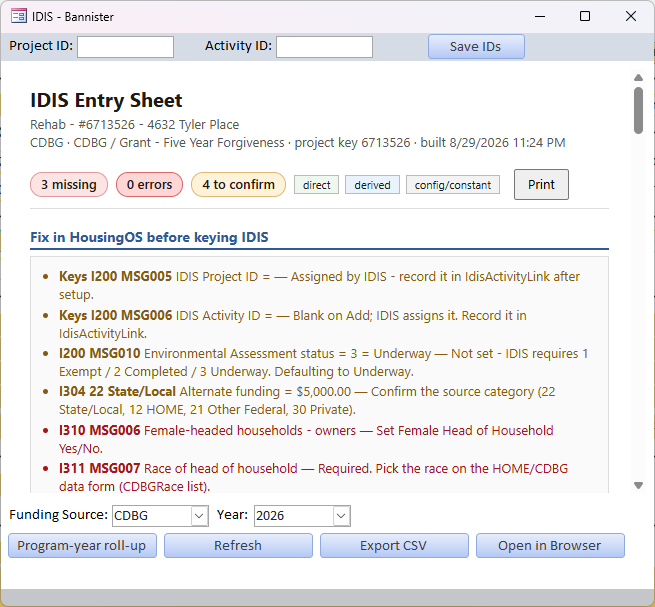
- Click IDIS on DATA TRACKING. The IDIS Entry Sheet opens with counters — N missing · N errors · N to confirm — and a legend (direct · derived · config/constant). The first section, Fix in HousingOS before keying IDIS, lists each problem with its IDIS screen/field code (e.g. I311 MSG007 Race of head of household — Required) and what to do; the rest is the sheet in IDIS order. Fix items on their own tabs and click Refresh.
- Enter the IDIS Project ID and IDIS Activity ID once IDIS assigns them and click Save IDs ("IDIS Project ID must be a number (or blank)."). They print on later sheets and reports.
- Print the sheet for the IDIS data-entry person, Open in Browser for a full-size view, or Export CSV ("Open the IDIS sheet from a project to export its CSV." — export is per project).
📷
C22-01IDIS entry sheet with colours.
Part C — Program-year roll-up
- Program-year roll-up — pick the Funding Source (CDBG / HOME …) and Year at the foot of the window and the sheet becomes the year's activity list with totals; the same Print / Export apply. The Report Center's IDIS Export – CDBG / – HOME presets produce the year's spreadsheet with the IDIS column set (▸ C-21).
Watch-outs
- Amber means HousingOS guessed (e.g. household type from member relationships) — check it against the file before entering in IDIS.
- HOME vs CDBG show different fields; pick the right funding source on the project before reading the sheet.
- IDs are per project — don't reuse an activity ID across projects.
Screenshot shot list
| Shot | What |
|---|---|
| C22-01 | ✅ have it |
| C22-02 | Roll-up for a funding source/year |
Open items for John
answered 08-29.