C-7 · Credit, Creditors and Debt-to-Income
Draft page
Captions marked [confirm] and the "Open items" section are still being verified against the live product.
Book C — Daily User Guide · Part 2 Applicants & Intake · draft v1 (2026-08-29)
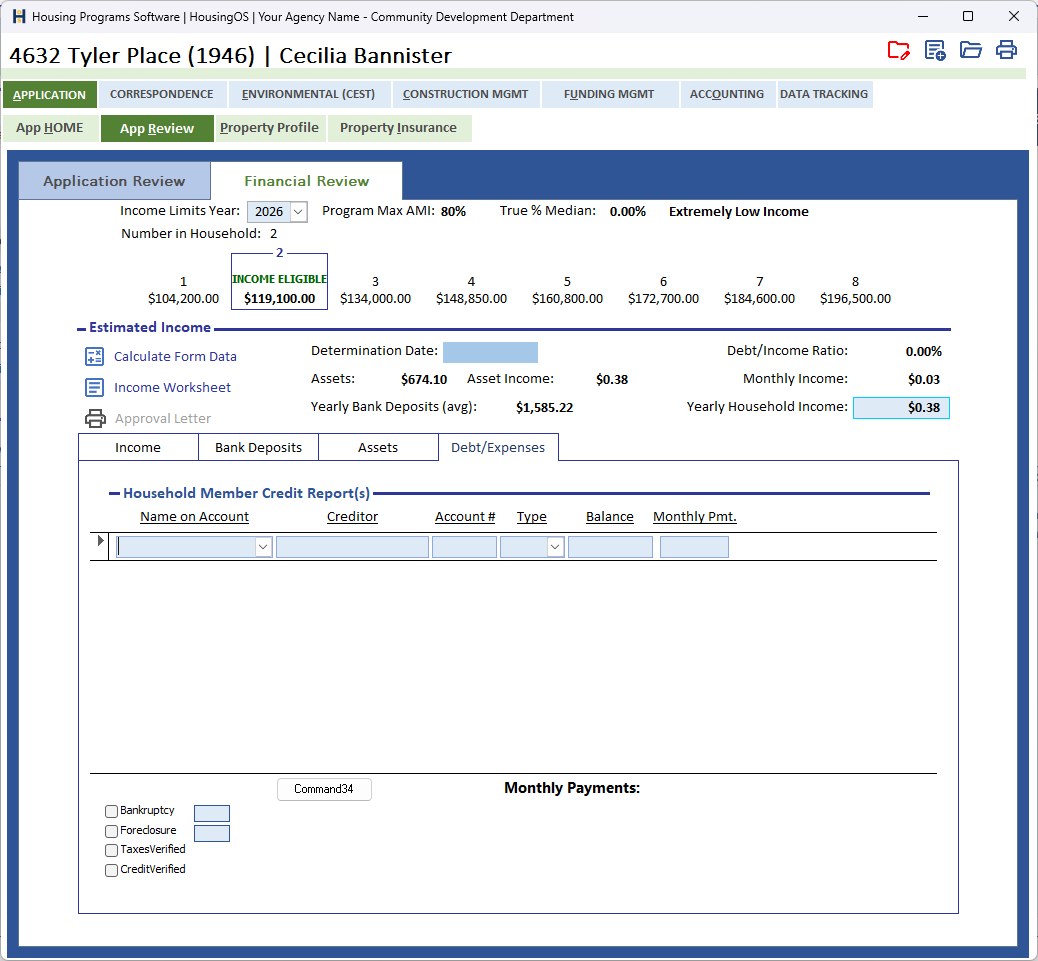
Who: loan coordinators When: alongside income determination (▸ C-6), before approval. Where: project window ▸ APPLICATION ▸ App Review ▸ Financial Review ▸ Debt/Expenses sub-tab — the Household Member Credit Report(s) grid, with the credit-history ticks below it. 📷
C07-00
What you'll end up with
The household's monthly debt payments listed, giving the Debt/Income Ratio shown on Financial Review; existing mortgages carried over to the property record for the equity check; and the credit-history questions (bankruptcy, foreclosure, credit and tax verification) answered for the file.
Part A — Creditors
- On Debt/Expenses, add one row per obligation: Name on Account (household member), Creditor, Account #, Type (mortgage, auto, credit card, …), Balance and Monthly Pmt.
- Monthly Payments (total) updates as you type, and Financial Review recalculates Debt/Income Ratio = Payment Total ÷ Monthly Income (▸ C-6 shows the ratio beside the determination).
- Transfer Mortgage Amounts [confirm caption] copies the mortgage rows to the Property Profile so the Mortgages figure there matches (▸ C-9) — used by the loan-to-value check.
📷
C07-01Debt/Expenses with three creditor rows and the Payment Total.
Part B — Expenses
- The Expenses list (not on this sub-tab — confirm where) records recurring household expenses (utilities, insurance, taxes …) for the file and the income worksheet. Add / delete rows with its buttons; they don't affect the debt ratio.
Part C — Credit history
- Under the grid tick Bankruptcy and/or Foreclosure if applicable — the year box beside each becomes enabled only when ticked (and is cleared if you untick).
- Tick CreditVerified and TaxesVerified once you have the credit report and tax transcripts on file. These are also read by the approval checklist.
📷
C07-02Credit-history block.
Part D — Mortgage verification and equity
- Mortgage Verification [confirm caption] merges the Mortgage Verification Letter to the first-deed-of-trust lender. It needs the lender's name and address entered first — otherwise "Required First Deed of Trust Document Recording Information is Missing. Please enter this information on this page – in BOLD Blue."
- When you enter the Loan Amount on the Application Review, HousingOS checks it against available equity — 95 % of Appraised Value minus Mortgages. If it's higher you're asked "Loan Amount Exceeds Available Equity!!" — OK reduces the loan to the available equity; Cancel keeps your figure.
Watch-outs
- The ratio uses Monthly Income from the income determination — if income hasn't been entered the ratio shows 0.00 %, not an error.
- Enter every mortgage as a creditor — the equity check and the property record rely on the transferred figure.
- Deleting a creditor asks for confirmation; there is no undo.
- "No Document Set-Up For This Coded Name 'Mortgage Verification Letter'" — template missing for the program; agency administrator (▸ B-7).
Screenshot shot list (Demo backend)
| Shot | Where | What to capture |
|---|---|---|
| C07-00 | Debt/Expenses sub-tab | whole tab (locks captions) |
| C07-02 | credit-history block | Bankruptcy/Foreclosure/Verified ticks, wherever they live |
Video script — "Debts and credit" (target 1 min)
| # | On screen | Narration |
|---|---|---|
| 1 | Debt/Expenses | "List each debt with its balance and monthly payment. The payment total feeds the debt-to-income ratio on Financial Review." |
| 2 | Transfer Mortgage Amounts | "Transfer Mortgage Amounts copies mortgages to the property record for the equity check." |
| 3 | Credit-history ticks | "Record bankruptcy or foreclosure with the year, and tick Credit Verified and Taxes Verified when the documents are in." |
| 4 | Outro | "Next: application processing checklist." |
Open items for John (this chapter)
credit-history location / columnsconfirmed 08-29.- ⚠ UI: the button under the grid is captioned Command34 — needs a real caption (Transfer Mortgage Amounts?). Where is Expenses?