The property page, for managers and owners
A property manager or owner does not sign in to NSPIREos. They receive an email with a link to their property page, scoped to the properties where their email address is on file as manager or owner. The link works for 180 days; a fresh one arrives with the next report. There is no password to remember, so the link should not be forwarded.
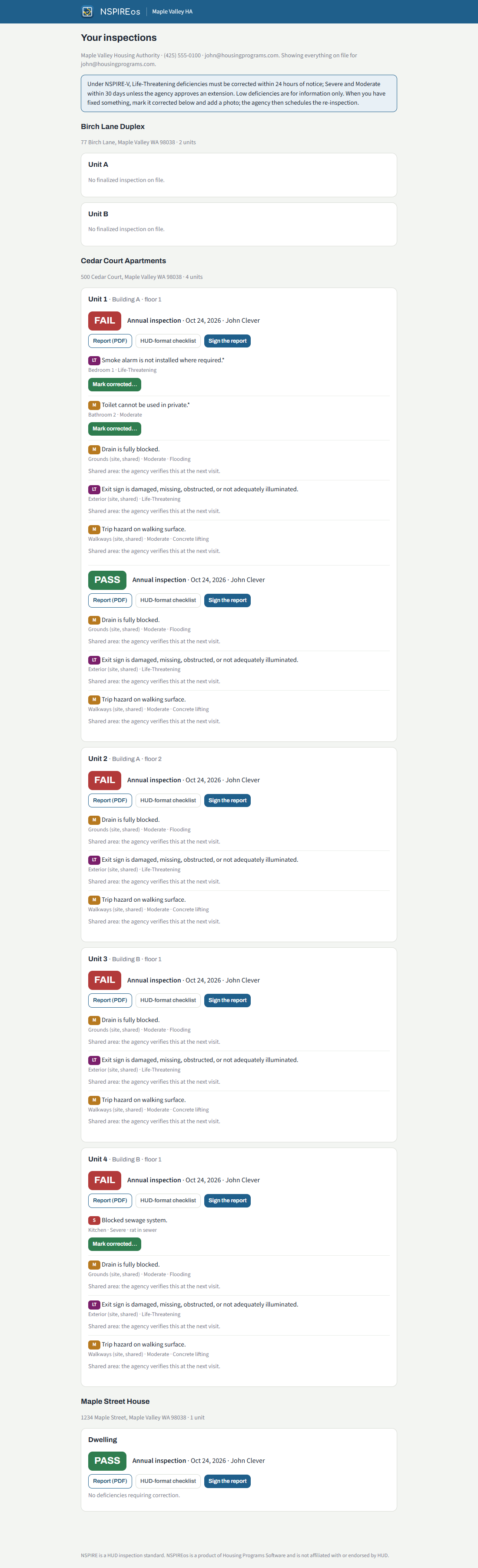
What is on it
- Every property and unit on file for that person, with the latest inspection and its result.
- Report (PDF) and HUD-format checklist for every finalized inspection.
- Each deficiency with its severity and room. Shared-area deficiencies (grounds, hallways) are listed too and say "the agency verifies this at the next visit".
- Photos from the inspection, when the agency has turned that on.
Reporting a correction
When the agency tracks corrections, every Life-Threatening, Severe or Moderate deficiency in the unit has Mark corrected…. The manager adds a note and, if they want, a photo of the repair. The agency sees it at once; when every open deficiency is reported, the unit moves to "reported corrected" and the agency schedules the re-inspection. Take back undoes a report made by mistake. The inspector verifies at the re-inspection; the manager's report does not close the deficiency on its own.
Signing the report
Sign the report opens a signature box. A signature added here lands on the report, which is rebuilt the next time anyone opens it. This is how an owner who was not present at the inspection signs.
For the office
A link is emailed automatically after every finalized inspection when Track corrections or Email managers their property page link is on in Settings. To send one by hand, open the property in the admin and use Property page link…; the link is also shown so you can pass it along another way. Changing the manager's email on the property changes who the next link goes to; old links keep working until they expire.